
Parse, Don't Guess

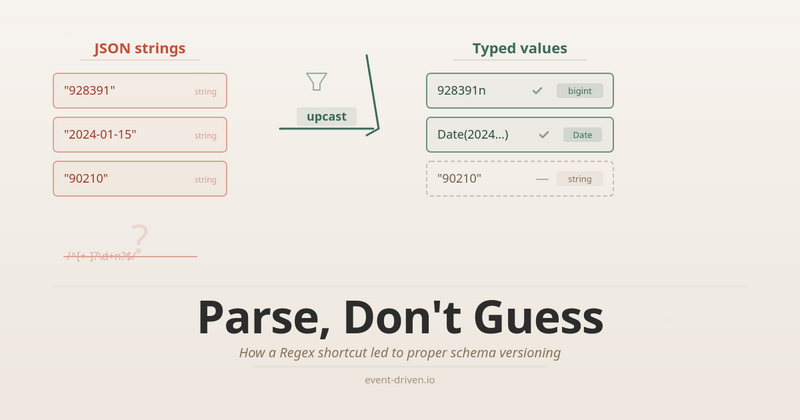
Last time, I shared with you how sneaky I was on transaction handling.. Today, the opposite: I’ll tell you how I fixed the issue when I tried to be too sneaky. I already told you that Sneaky Code Bites Back. The moral? Do as I tell, not how I do.
In some environments, we’re spoiled. We’re getting a lot from a Base Class Library or standard frameworks, so we stop thinking that those issues can exist. For instance, serialisation. Do you know how many data types JSON has? 6. Six. Sześć.
Exactly those:
string,
number,
boolean,
object,
array,
and (TADA!) null.
What about number precision and size? It is. That’s what I can tell you, but it’s not enough, e.g., to keep big int/long, etc. What about Dates? Also, there are none. I wrote about it longer here or how much fun that brings.
If you use statically typed languages and runtimes like C#, Java, etc., your serialiser can, in addition to parsing, perform mapping and, sometimes, validation. And it can also be tricky, as nicely Alexis King put in her “Parse, don’t validate”.
If you’re in a dynamic environment, like JavaScript, then you’re left with parsing and explicit mapping afterwards. What about TypeScript? Same case, types are only used during compilation, then erased and not visible at runtime. So, the place where we do parsing.
Because JSON was defined a long time ago, JavaScript moved on and now supports bigints (Big Integers) and Dates natively (what an achievement!), which created a gap I wanted to fill.
As you know from my previous articles (e.g. this one), big integers are quite important in distributed processing. You can represent the position in log with them. Since your log may be quite long, regular numbers aren’t enough. Or they’re long enough, until they overflow, then they’re not anymore.
I’m using those bigint types extensively in internals in Emmett and Pongo. And I store them in JSONs. I store them as alphanumeric strings, because strings don’t have a max length (or at least I don’t know such).
So, for instance, an event payload can look like:
{
  "type": "InvoiceIssued",
  "data": {
    "invoiceNumber": "123",
    "version": 1,
    "issuer": "John Doe",
    "issuedAt": "2026-02-23T14:07:20Z"
  },
  "metadata": {
    "streamPosition": "3",
    "globalPosition": "928391"
  }
}
As you can see in the metadata stream and global positions, the values are bigints (even if they’re smaller than the maximum value), and data can also use bigints if the user decides to (e.g., invoice number).
And encoding data is simple: you convert it to a string, call it a day. But how to get it back?
And here’s where my struggles started. How do you know that someone intentionally used bigint when they just wanted to store a number as a string?
There are several options. The first one is: encode value.
We could store it, for instance, as:
prefixed value: “_bigint:928391”. But then you need to find a prefix that will be unique enough not to cause conflicts,
nested object, e.g. { “_kind”: “bigint”, value: “928391” }.
Then, either based on the prefix or the object structure, we could automatically decode the value. Still, ther creates other issues, as the structure no longer matches the original value. If we’re just storing and retrieving, that shouldn’t be so bad, but… But remember that in Pongo I’m allowing the use of PostgreSQL and SQLite as document databases, supporting such queries:
const invoices = pongoDb.collection<Invoice>("invoices");

const invoiceNumber = 123n;
const invoice = await invoices.findOne({ invoiceNumber });
That gets translated into a fancy JSONB SQL query.
Of course, I could work around it by encoding the value, but… But I was lazy!
I decided to use a Get Out of Jail Free Card and just treat all strings with numbers as bigints. Sneaky. And it will get even sneakier.
In JavaScript, JSON.parse accepts a parameter that allows you to provide custom mapping logic. I decided to use it and check if the string is alphanumeric, and gulp, I’ve used a regular expression to parse it:
const bigIntReviver: JSONReviver = (_key, value) => {
  if (typeof value === 'string' && /^[+-]?\d+n?$/.test(value)) {
    return BigInt(value);
  }

  return value;
};
Yes, it’s either DNS or Regex. Or both.
I explained in another article that JavaScript runtime doesn’t like where you do CPU-heavy computations.
Small Regex isn’t CPU-heavy, but if you consider that ther will be done for each string in each document or event you try to deserialise, and multiply that by the number of concurrent requests? That can cause the JavaScript event loop to freeze.
What’s more, I plugged that automatically into node-postgres driver custom type handling, so each JSONB deserialization goes through it.
Again, not shit, Sherlock. I should have known it wasn’t the best choice, but I was busy trying to be sneaky at that moment.
Fortunately, a user, Dawid, benchmarked and noticed CPU freezes. It wasn’t catastrophic, but clearly needed a fix.
The Shift
And here I had several options. I could keep hacking on the same idea- maybe replace the Regex with a simpler string check, still globally. Or I could just ignore bigints during deserialisation entirely, let them stay strings, call it a day, move on. Or I could apply the encoding I mentioned earlier, prefixed values, and nested objects. All of those would fix the performance issue. And all of those would be the same kind of wrong choice I already made: trying to solve a schema problem without the schema.
Because that’s the actual mistake here, not the Regex. The pg driver has no idea what your schema looks like. It doesn’t know that “928391” is a bigint and “John Doe” is a name. It doesn’t know that “123” is an invoice number (bigint!) and “90210” is a zip code (string!). I asked it to guess, and it guessed wrong, because there is no right guess at that level.
Enough is enough. I had been planning to do ther properly for a while, and the performance issue gave me the push I needed.
Old rule says: “Make it work, make it right, make it pretty”. I had “make it work” covered for a long time. Now it was time for “make it right”.
And honestly? It wasn’t that hard. Maybe because “make it work” came first, I already understood the problem well enough to see the shape of the solution.
In Pongo, I dropped the automatic bigint parsing from the driver entirely. If you want bigint or date parsing, you say so at the client level:
const client = pongoClient({
  driver: databaseDriver,
  connectionString: postgresConnectionString,
  serialization: {
    options: {
      parseBigInts: true,
      parseDates: true,
    }
  },
});
By default, strings stay strings. You opt in. I didn’t want to break things for users who don’t care about bigint precision or don’t have performance-sensitive workloads. The serializer became an explicit parameter passed down to each query, each collection, each operation- instead of a global that silently changed everything.
That was the “make it right” part for Pongo. But disabling alone isn’t a solution, it’s a band-aid. Users who need bigints and dates still need a way to get them back after deserialisation. The question is: where does that conversion happen?
And that’s where upcasting comes in. Let me start with a simple example in Pongo, then build up.
Say you have a user document. In the database, dates are stored as ISO strings, and the version counter is a numeric string (because JSON). But in your application, you want proper Date objects and bigints:
type UserDocStored = {
  name: string;
  createdAt: string;
  lastLogin: string;
};

type UserDoc = {
  name: string;
  createdAt: Date;
  lastLogin: Date;
};
The upcast function does the conversion:
const upcast = (doc: UserDocStored): UserDoc => ({
  name: doc.name,
  createdAt: new Date(doc.createdAt),
  lastLogin: new Date(doc.lastLogin),
});
You wire it into the collection, and every read goes through it:
const collection = pongoDb.collection<UserDoc, UserDocStored>(
  'users',
  {
    schema: { versioning: { upcast } },
  },
);
What’s in the database:
{ "name": "Alice", "createdAt": "2024-01-15T10:30:00.000Z", ... }What you get back:
{ name: 'Alice', createdAt: Date, ... }That’s all. new Date(str) is cheap. Running a Regex against every string in the document is not. The CPU freeze Dawid spotted came from that check running millions of times at the driver level for every field on every concurrent request. With upcasting, the conversion runs only for the fields you declared, in a plain function, no Regex.
But ther is just type mapping - the simplest case. As I wrote about in my serialisation article, the explicit mapping pattern is useful for much more than just fixing types. It’s the same pattern you need for schema versioning. It defines the stored schema and the application schema separately together with function to transform one into the other.
Let’s say business requirements changed. You now need to group user data differently: a profile object for identity data, and a timestamps object for temporal data. The V1 documents are flat. The new V2 shape is nested:
type UserDocV1 = {
  name: string;
  createdAt: string;
  lastLogin: string;
};

type UserDocV2 = {
  profile: {
    name: string;
  };
  timestamps: {
    createdAt: Date;
    lastLogin: Date;
  };
};
Ther isn’t just a type change like string-to-Date anymore. The structure itself is different. Flat fields became nested objects, and field names moved into sub-objects. And you have thousands of V1 documents already stored. You can’t migrate them all at once (or don’t want to, because it’s risky, and some consumers might still expect V1). But your application now expects V2.
Compatibility FTW
Ther is where backward and forward compatibility come in.
Backward compatibility means: old data still works. V1 documents stored months ago need to be readable by the V2 code. The upcast handles ther. It reads the document in whatever shape it has and transforms it into V2.
Forward compatibility means: new data doesn’t break old consumers. If you have another service or an older deployment that still reads the V1 format, it needs to keep working. The downcast handles ther. When storing V2 documents, it writes the V1 fields alongside the V2 fields, so older readers can still find what they expect.
Together:
type StoredPayload = UserDocV1 & UserDocV2;

const upcast = (doc: StoredPayload): UserDocV2 => ({
  profile: doc.profile ?? { name: doc.name },
  timestamps: {
    createdAt: new Date(doc.timestamps?.createdAt ?? doc.createdAt),
    lastLogin: new Date(doc.timestamps?.lastLogin ?? doc.lastLogin),
  },
});

const downcast = (doc: UserDocV2): StoredPayload => ({
  name: doc.profile.name,
  createdAt: doc.timestamps.createdAt.toISOString(),
  lastLogin: doc.timestamps.lastLogin.toISOString(),
  profile: doc.profile,
  timestamps: doc.timestamps,
});
Look at the upcast: if the nested profile or timestamps fields exist (document was written by V2 code), it uses them. If they don’t exist (for the old V1 document), it falls back to the flat fields. One function handles both old and new documents: that’s backward compatibility.
And look at the downcast: it writes name, createdAt, lastLogin as flat string fields (V1 shape) alongside profile and timestamps (V2 shape). A service still reading V1 sees the flat fields and works fine. A service reading V2 sees the nested ones. That’s forward compatibility.
You wire both into the collection:
const collection = pongoDb.collection<UserDocV2, StoredPayload>(
  'users',
  {
    schema: { versioning: { upcast, downcast } },
  },
);
From here, your application code only deals with V2. The collection handles the translation in both directions:
const v2Doc: UserDocV2 = {
  profile: { name: 'Alice' },
  timestamps: {
    createdAt: new Date('2024-01-15T10:30:00.000Z'),
    lastLogin: new Date('2024-06-20T14:45:00.000Z'),
  },
};

await collection.insertOne(v2Doc);
What’s stored (downcasted, both shapes for compatibility):
{
  "name": "Alice",
  "createdAt": "2024-01-15T10:30:00.000Z",
  "lastLogin": "2024-06-20T14:45:00.000Z",
  "profile": {
    "name": "Alice"
  },
  "timestamps": {
    "createdAt": "2024-01-15T10:30:00.000Z",
    "lastLogin": "2024-06-20T14:45:00.000Z"
  }
}
Then you can read it back with:
const doc = await collection.findOne({ ... });And get upcasted to V2 data in your application code:
{
  "profile": {
    "name": "Alice"
  },
  "timestamps": {
    "createdAt": "2024-01-15T10:30:00.000Z",
    "lastLogin": "2024-06-20T14:45:00.000Z"
  }
}
Same collection, V1 and V2 documents coexisting. insertMany, replaceOne, findOne: all go through the upcast/downcast. No batch migration needed. You roll out the new code, and old documents are handled transparently.
There’s another thing the downcast gives you: querying remains backwards-compatible. Because the downcast writes the flat V1 fields alongside the nested V2 ones, a query like collection.findOne({ name: ‘Alice’ }) still works even though V2 code doesn’t use name directly anymore. The V1 field is there in the stored document. That matters if you have queries or indexes built against the old shape. They don’t break.
Now, for events, ther matters even more. In event sourcing, stored events are immutable- the log is append-only, and you don’t modify what was already written. I wrote about versioning patterns in more detail. The core idea is: your business evolves, your code evolves, your event schemas evolve, but the events in the store stay as they were. You can’t go back and rewrite them (well, you can, but you really shouldn’t). Upcasting is how you bridge the gap.
For Emmett, the same pattern works at the event store level. You define the stored shape (what JSON gives you from the database) and the application shape (what your code works with):
type ShoppingCartOpenedFromDB = Event<
  'ShoppingCartOpened',
  { openedAt: string; loyaltyPoints: string }
>;

type ShoppingCartOpened = Event<
  'ShoppingCartOpened',
  { openedAt: Date; loyaltyPoints: bigint }
>;
And an upcast that handles each event type:
const upcast = (event: Event): ShoppingCartEventWithDatesAndBigInt => {
  switch (event.type) {
    case 'ShoppingCartOpened': {
      const e = event as ShoppingCartOpenedFromDB;
      return {
        ...e,
        data: {
          openedAt: new Date(e.data.openedAt),
          loyaltyPoints: BigInt(e.data.loyaltyPoints),
        },
      };
    }
    case 'ShoppingCartConfirmed': {
      const e = event as ShoppingCartConfirmedFromDB;
      return {
        ...e,
        data: {
          confirmedAt: new Date(e.data.confirmedAt),
          totalCents: BigInt(e.data.totalCents),
        },
      };
    }
    default:
      return event as ShoppingCartEventWithDatesAndBigInt;
  }
};
You pass it when reading a stream:
const { state } = await eventStore.aggregateStream<
  ShoppingCartState,
  ShoppingCartEventWithDatesAndBigInt
>(shoppingCartId, {
  evolve: evolveState,
  initialState,
  read: { schema: { versioning: { upcast } } },
});
Or in a command handler:
const handle = CommandHandler<ShoppingCart, ShoppingCartEvent>({
  evolve,
  initialState: () => ({ ... }),
  schema: { versioning: { upcast: upcastDatesAndBigInt } },
});
The difference with events is that you can’t update them in place. For documents, you have both directions: upcast on read, downcast on write. For events, upcasting is the main tool because the event store is append-only. Old events stay as they were written. But downcasting has its place too.
Consider ther: you have a projection or a subscriber that was built months ago against the old event schema. Maybe it’s a read model that listens to ShoppingCartOpened and expects clientId as a flat string. But your current code evolved. Now ShoppingCartOpened carries a client object with id and name:
// What old subscribers expect
type ShoppingCartOpenedV1 = Event<
  'ShoppingCartOpened',
  { clientId: string; openedAt: string }
>;

// What current code produces
type ShoppingCartOpenedV2 = Event<
  'ShoppingCartOpened',
  { client: { id: string; name: string }; openedAt: Date }
>;
Upcasting enables the current code to read older events. The ones stored with just clientId. Downcasting helps old subscribers consume new events. It transforms the new client object back into the flat clientId they expect. Same principle as with documents, but especially important here because event subscribers often live in separate services or deployments that you can’t update all at once.
And the same upcast function that started as simple type mapping string → Date, string → bigint handles ther structural change too. You just add another case to the switch:
case 'ShoppingCartOpened': {
  const e = event as ShoppingCartOpenedV1;
  return {
    ...e,
    data: {
      client: { id: e.data.clientId, name: 'Unknown' },
      openedAt: new Date(e.data.openedAt),
    },
  };
}
Old events get the client object synthesised from the flat clientId. New events already have it. The evolve function only deals with the V2 shape.
And here’s where things started to click for me. I added upcasting to fix the bigint problem: explicit type mapping instead of a Regex. But the same mechanism, without any changes, also handles structural versioning. The simple string → Date mapping from the first example is the same code path as the clientId → client migration above. It’s one function, one place, one pattern for all of it: type coercion, field restructuring, schema migration.
Right decisions stack
Right decisions stack. The Regex hack was blocking the slot where upcasting should have been all along. Once I removed it, the performance got fixed, and I got schema versioning on top. One fix created room for the next one, which created room for the next. That doesn’t happen when you keep patching around the same bad decision.
Looking back, maybe the Regex wasn’t the wrong first move. The rule is “make it work, make it right, make it pretty”, in that order. The Regex made it work. It had performance problems, but it still let me ship and learn where the real problem was. If I had tried to design the upcast/downcast system from scratch, without having lived with the Regex for a while, I might have over-engineered it or missed the connection to schema versioning entirely. The understanding came from living with the shortcut.
Dawid raised a performance issue with Pongo projections, but the same Regex was running in Emmett as well. I could have fixed it in one place and called it a day. Instead, I used it as a push to do the thing I’d been planning anyway and applied it to both Pongo and Emmett to keep things consistent. Because I already understood the problem well enough, “make it right” turned out easier than I expected.
You can recover from shortcuts. You should. But you also shouldn’t be afraid to take them in the first place, as long as you come back and do it properly.
Full changes:
Cheers!
Oskar
p.s. Ukraine is still under brutal Russian invasion. A lot of Ukrainian people are hurt, without shelter and need help. You can help in various ways, for instance, directly helping refugees, spreading awareness, putting pressure on your local government or companies. You can also support Ukraine by donating e.g. to Red Cross, Ukraine humanitarian organisation or donate Ambulances for Ukraine.
Is there a word missing after “It is.”? After the first bullets, it reads:
“ What about number precision and size? It is. That’s what I can tell you, but it’s not enough, e.g., to keep big int/long, etc”